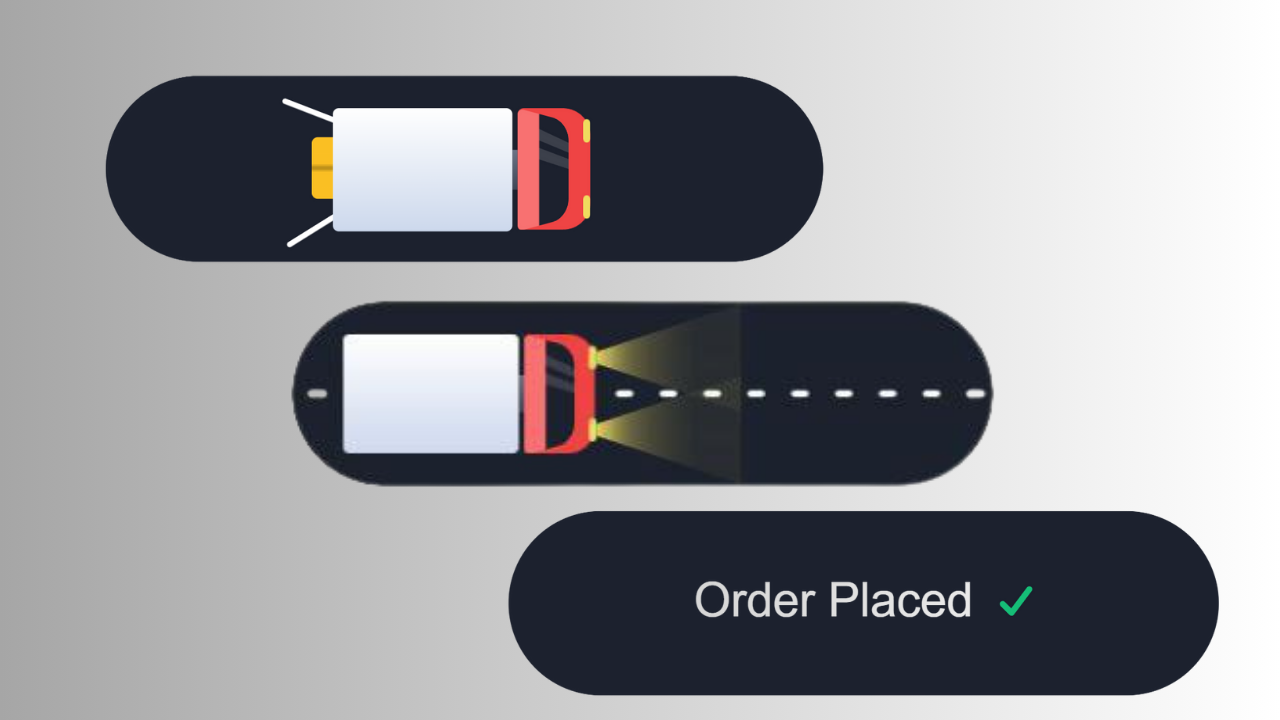
Using HTML, CSS, and JavaScript, the Animated Order Button is a contemporary UI interaction element.
By turning a straightforward button into a fluid and eye-catching animation, it improves user engagement.
For beginners and front-end learners who want to enhance their UI/UX design skills without using complex frameworks, this project is ideal.
- Discover how to use basic
<button> and <div> elements to organize the button layout.
- Create press, loading, and success animations using CSS transitions and
@keyframes.
- Enhance UI with micro-animations such as color changing, scaling, and glow effects.
- Make the button fully responsive for both desktop and mobile screens.
- Control animation states like "Ordering", "Processing", and "Completed" using JavaScript.
How to Design:
HTML Structure: Start with a simple <button> element and add extra <span> layers for icon and text effects.
Keep the structure clean and minimal.
CSS Styling: Use transition, transform, and @keyframes to build smooth animations.
Apply gradients and soft shadows to make the button visually appealing.
JavaScript Interaction: Use event listeners to trigger animation states.
On click → show loading animation → then display success animation, making the button feel dynamic and interactive.
:root {
    /* --primary: #275EFE; */
    --primary: #ef4444;
    /* --primary-light: #7699FF; */
    --primary-light: #f87171;
    --dark: #1C212E;
    --grey-dark: #3F4656;
    --grey: #6C7486;
    --grey-light: #CDD9ED;
    --white: #FFF;
    --green: #16BF78;
    --sand: #fbbf24;
    --sand-light: #fbbf24;
  }

  .order {
    -webkit-appearance: none;
       -moz-appearance: none;
            appearance: none;
    border: 0;
    background: var(--dark);
    position: relative;
    height: 63px;
    width: 240px;
    padding: 0;
    outline: none;
    cursor: pointer;
    border-radius: 32px;
    -webkit-mask-image: -webkit-radial-gradient(white, black);
    -webkit-tap-highlight-color: transparent;
    overflow: hidden;
    transition: transform 0.3s ease;
  }
  .order span {
    --o: 1;
    position: absolute;
    left: 0;
    right: 0;
    text-align: center;
    top: 19px;
    line-height: 24px;
    color: var(--white);
    font-size: 16px;
    font-weight: 500;
    opacity: var(--o);
    transition: opacity 0.3s ease;
  }
  .order span.default {
    transition-delay: 0.3s;
  }
  .order span.success {
    --offset: 16px;
    --o: 0;
  }
  .order span.success svg {
    width: 12px;
    height: 10px;
    display: inline-block;
    vertical-align: top;
    fill: none;
    margin: 7px 0 0 4px;
    stroke: var(--green);
    stroke-width: 2;
    stroke-linecap: round;
    stroke-linejoin: round;
    stroke-dasharray: 16px;
    stroke-dashoffset: var(--offset);
    transition: stroke-dashoffset 0.3s ease;
  }
  .order:active {
    transform: scale(0.96);
  }
  .order .lines {
    opacity: 0;
    position: absolute;
    height: 3px;
    background: var(--white);
    border-radius: 2px;
    width: 6px;
    top: 30px;
    left: 100%;
    box-shadow: 15px 0 0 var(--white), 30px 0 0 var(--white), 45px 0 0 var(--white), 60px 0 0 var(--white), 75px 0 0 var(--white), 90px 0 0 var(--white), 105px 0 0 var(--white), 120px 0 0 var(--white), 135px 0 0 var(--white), 150px 0 0 var(--white), 165px 0 0 var(--white), 180px 0 0 var(--white), 195px 0 0 var(--white), 210px 0 0 var(--white), 225px 0 0 var(--white), 240px 0 0 var(--white), 255px 0 0 var(--white), 270px 0 0 var(--white), 285px 0 0 var(--white), 300px 0 0 var(--white), 315px 0 0 var(--white), 330px 0 0 var(--white);
  }
  .order .back,
  .order .box {
    --start: var(--white);
    --stop: var(--grey-light);
    border-radius: 2px;
    background: linear-gradient(var(--start), var(--stop));
    position: absolute;
  }
  .order .truck {
    width: 60px;
    height: 41px;
    left: 100%;
    z-index: 1;
    top: 11px;
    position: absolute;
    transform: translateX(24px);
  }
  .order .truck:before, .order .truck:after {
    --r: -90deg;
    content: "";
    height: 2px;
    width: 20px;
    right: 58px;
    position: absolute;
    display: block;
    background: var(--white);
    border-radius: 1px;
    transform-origin: 100% 50%;
    transform: rotate(var(--r));
  }
  .order .truck:before {
    top: 4px;
  }
  .order .truck:after {
    --r: 90deg;
    bottom: 4px;
  }
  .order .truck .back {
    left: 0;
    top: 0;
    width: 60px;
    height: 41px;
    z-index: 1;
  }
  .order .truck .front {
    overflow: hidden;
    position: absolute;
    border-radius: 2px 9px 9px 2px;
    width: 26px;
    height: 41px;
    left: 60px;
  }
  .order .truck .front:before, .order .truck .front:after {
    content: "";
    position: absolute;
    display: block;
  }
  .order .truck .front:before {
    height: 13px;
    width: 2px;
    left: 0;
    top: 14px;
    background: linear-gradient(var(--grey), var(--grey-dark));
  }
  .order .truck .front:after {
    border-radius: 2px 9px 9px 2px;
    background: var(--primary);
    width: 24px;
    height: 41px;
    right: 0;
  }
  .order .truck .front .window {
    overflow: hidden;
    border-radius: 2px 8px 8px 2px;
    background: var(--primary-light);
    transform: perspective(4px) rotateY(3deg);
    width: 22px;
    height: 41px;
    position: absolute;
    left: 2px;
    top: 0;
    z-index: 1;
    transform-origin: 0 50%;
  }
  .order .truck .front .window:before, .order .truck .front .window:after {
    content: "";
    position: absolute;
    right: 0;
  }
  .order .truck .front .window:before {
    top: 0;
    bottom: 0;
    width: 14px;
    background: var(--dark);
  }
  .order .truck .front .window:after {
    width: 14px;
    top: 7px;
    height: 4px;
    position: absolute;
    background: rgba(255, 255, 255, 0.14);
    transform: skewY(14deg);
    box-shadow: 0 7px 0 rgba(255, 255, 255, 0.14);
  }
  .order .truck .light {
    width: 3px;
    height: 8px;
    left: 83px;
    transform-origin: 100% 50%;
    position: absolute;
    border-radius: 2px;
    transform: scaleX(0.8);
    background: #f0dc5f;
  }
  .order .truck .light:before {
    content: "";
    height: 4px;
    width: 7px;
    opacity: 0;
    transform: perspective(2px) rotateY(-15deg) scaleX(0.94);
    position: absolute;
    transform-origin: 0 50%;
    left: 3px;
    top: 50%;
    margin-top: -2px;
    background: linear-gradient(90deg, #f0dc5f, rgba(240, 220, 95, 0.7), rgba(240, 220, 95, 0));
  }
  .order .truck .light.top {
    top: 4px;
  }
  .order .truck .light.bottom {
    bottom: 4px;
  }
  .order .box {
    --start: var(--sand-light);
    --stop: var(--sand);
    width: 21px;
    height: 21px;
    right: 100%;
    top: 21px;
  }
  .order .box:before, .order .box:after {
    content: "";
    top: 10px;
    position: absolute;
    left: 0;
    right: 0;
  }
  .order .box:before {
    height: 3px;
    margin-top: -1px;
    background: rgba(0, 0, 0, 0.1);
  }
  .order .box:after {
    height: 1px;
    background: rgba(0, 0, 0, 0.15);
  }
  .order.animate .default {
    --o: 0;
    transition-delay: 0s;
  }
  .order.animate .success {
    --offset: 0;
    --o: 1;
    transition-delay: 7s;
  }
  .order.animate .success svg {
    transition-delay: 7.3s;
  }
  .order.animate .truck {
    -webkit-animation: truck 10s ease forwards;
            animation: truck 10s ease forwards;
  }
  .order.animate .truck:before {
    -webkit-animation: door1 2.4s ease forwards 0.3s;
            animation: door1 2.4s ease forwards 0.3s;
  }
  .order.animate .truck:after {
    -webkit-animation: door2 2.4s ease forwards 0.6s;
            animation: door2 2.4s ease forwards 0.6s;
  }
  .order.animate .truck .light:before, .order.animate .truck .light:after {
    -webkit-animation: light 10s ease forwards;
            animation: light 10s ease forwards;
  }
  .order.animate .box {
    -webkit-animation: box 10s ease forwards;
            animation: box 10s ease forwards;
  }
  .order.animate .lines {
    -webkit-animation: lines 10s ease forwards;
            animation: lines 10s ease forwards;
  }

  @-webkit-keyframes truck {
    10%, 30% {
      transform: translateX(-164px);
    }
    40% {
      transform: translateX(-104px);
    }
    60% {
      transform: translateX(-224px);
    }
    75%, 100% {
      transform: translateX(24px);
    }
  }

  @keyframes truck {
    10%, 30% {
      transform: translateX(-164px);
    }
    40% {
      transform: translateX(-104px);
    }
    60% {
      transform: translateX(-224px);
    }
    75%, 100% {
      transform: translateX(24px);
    }
  }
  @-webkit-keyframes lines {
    0%, 30% {
      opacity: 0;
      transform: scaleY(0.7) translateX(0);
    }
    35%, 65% {
      opacity: 1;
    }
    70% {
      opacity: 0;
    }
    100% {
      transform: scaleY(0.7) translateX(-400px);
    }
  }
  @keyframes lines {
    0%, 30% {
      opacity: 0;
      transform: scaleY(0.7) translateX(0);
    }
    35%, 65% {
      opacity: 1;
    }
    70% {
      opacity: 0;
    }
    100% {
      transform: scaleY(0.7) translateX(-400px);
    }
  }
  @-webkit-keyframes light {
    0%, 30% {
      opacity: 0;
      transform: perspective(2px) rotateY(-15deg) scaleX(0.88);
    }
    40%, 100% {
      opacity: 1;
      transform: perspective(2px) rotateY(-15deg) scaleX(0.94);
    }
  }
  @keyframes light {
    0%, 30% {
      opacity: 0;
      transform: perspective(2px) rotateY(-15deg) scaleX(0.88);
    }
    40%, 100% {
      opacity: 1;
      transform: perspective(2px) rotateY(-15deg) scaleX(0.94);
    }
  }
  @-webkit-keyframes door1 {
    30%, 50% {
      transform: rotate(32deg);
    }
  }
  @keyframes door1 {
    30%, 50% {
      transform: rotate(32deg);
    }
  }
  @-webkit-keyframes door2 {
    30%, 50% {
      transform: rotate(-32deg);
    }
  }
  @keyframes door2 {
    30%, 50% {
      transform: rotate(-32deg);
    }
  }
  @-webkit-keyframes box {
    8%, 10% {
      transform: translateX(40px);
      opacity: 1;
    }
    25% {
      transform: translateX(112px);
      opacity: 1;
    }
    26% {
      transform: translateX(112px);
      opacity: 0;
    }
    27%, 100% {
      transform: translateX(0px);
      opacity: 0;
    }
  }
  @keyframes box {
    8%, 10% {
      transform: translateX(40px);
      opacity: 1;
    }
    25% {
      transform: translateX(112px);
      opacity: 1;
    }
    26% {
      transform: translateX(112px);
      opacity: 0;
    }
    27%, 100% {
      transform: translateX(0px);
      opacity: 0;
    }
  }
  html {
    box-sizing: border-box;
    -webkit-font-smoothing: antialiased;
  }

  * {
    box-sizing: inherit;
  }
  *:before, *:after {
    box-sizing: inherit;
  }

  body {
    min-height: 100vh;
    font-family: Roboto, Arial;
    display: flex;
    justify-content: center;
    align-items: center;
    background: white;
  }
  body .dribbble {
    position: fixed;
    display: block;
    right: 20px;
    bottom: 20px;
  }
  body .dribbble img {
    display: block;
    height: 28px;
  }

Leave Comments