
Travel Destinations Image Slider
- Nov 13, 2024
- 26

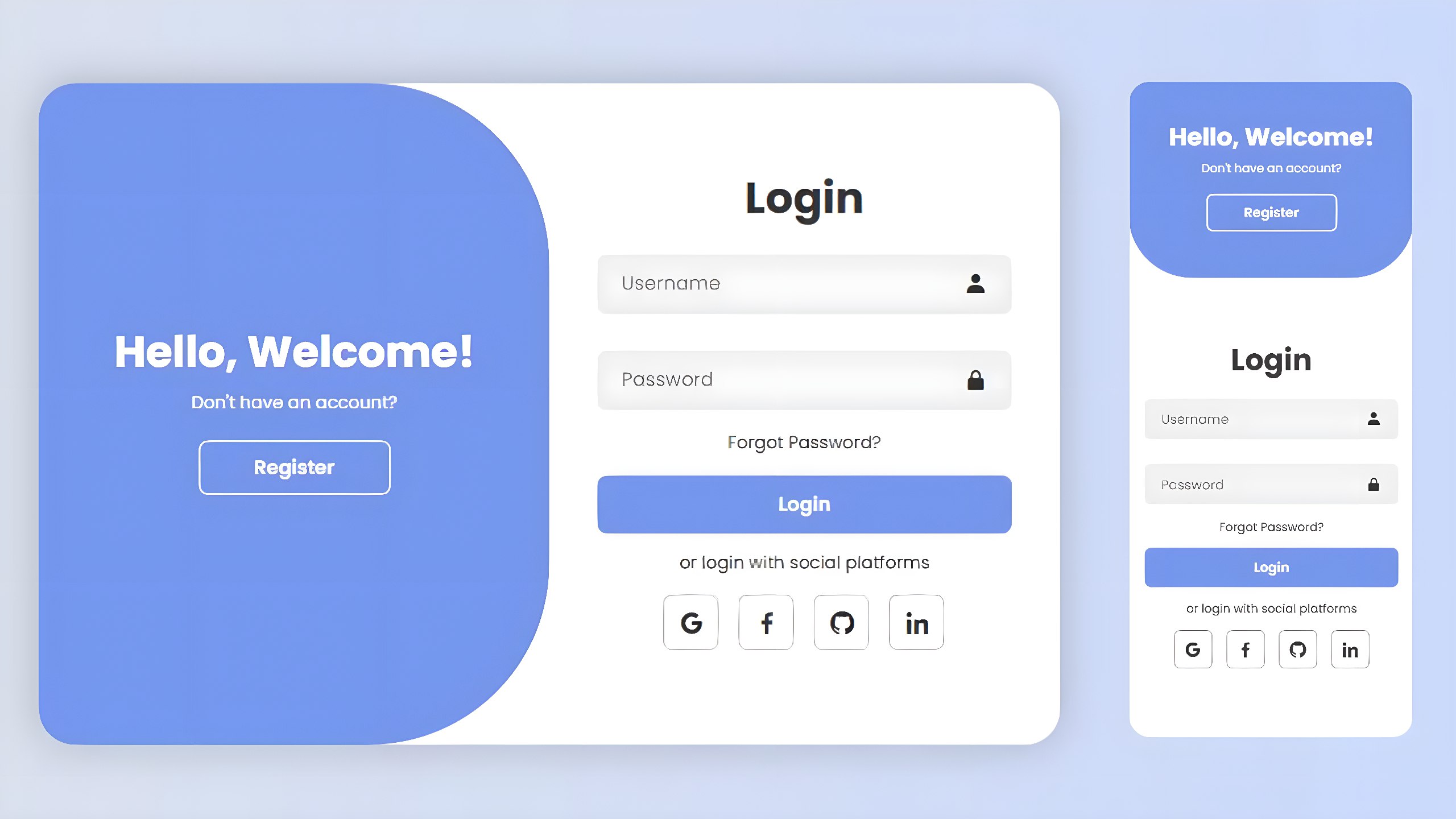
We'll demonstrate how to make a Login & SignUp Form that offers a seamless sliding interface between the two forms using simple HTML, CSS, and JavaScript. This project is ideal for beginners who want to understand how modern form UI works without the use of frameworks.
How to Create:
HTML Setup: Start by creating a main container that holds two forms — Login and SignUp. Use basic
<form>and<input>tags to add fields and buttons to each form.
CSS Styling: Give the container a smooth card-like appearance using border-radius and box-shadow. Style the input boxes with padding and focus effects. Use CSS transitions to animate the sliding movement between the forms.
JavaScript Toggle: Use a small JavaScript function that adds or removes a CSS class from the container. This switches between Login and SignUp forms smoothly, without reloading the page, making the interface interactive and clean.
<!DOCTYPE html>
<html lang="en">
<head>
    <meta charset="UTF-8">
    <meta name="viewport" content="width=device-width, initial-scale=1.0">
    <title>Login/Signup Form</title>
    <link rel="stylesheet" href="SignUp_LogIn_Form.css">
    <link href='https://unpkg.com/boxicons@2.1.4/css/boxicons.min.css' rel='stylesheet'>
</head>
  <body>

    <!-- credits to the writter @leonam-silva-de-souza -->
      <div class="container">
          <div class="form-box login">
              <form action="#">
                  <h1>Login</h1>
                  <div class="input-box">
                      <input type="text" placeholder="Username" required>
                      <i class='bx bxs-user'></i>
                  </div>
                  <div class="input-box">
                      <input type="password" placeholder="Password" required>
                      <i class='bx bxs-lock-alt' ></i>
                  </div>
                  <div class="forgot-link">
                      <a href="#">Forgot Password?</a>
                  </div>
                  <button type="submit" class="btn">Login</button>
                  <p>or login with social platforms</p>
                  <div class="social-icons">
                      <a href="#"><i class='bx bxl-google' ></i></a>
                      <a href="#"><i class='bx bxl-facebook' ></i></a>
                      <a href="#"><i class='bx bxl-github' ></i></a>
                      <a href="#"><i class='bx bxl-linkedin' ></i></a>
                  </div>
              </form>
          </div>

          <div class="form-box register">
              <form action="#">
                  <h1>Registration</h1>
                  <div class="input-box">
                      <input type="text" placeholder="Username" required>
                      <i class='bx bxs-user'></i>
                  </div>
                  <div class="input-box">
                      <input type="email" placeholder="Email" required>
                      <i class='bx bxs-envelope' ></i>
                  </div>
                  <div class="input-box">
                      <input type="password" placeholder="Password" required>
                      <i class='bx bxs-lock-alt' ></i>
                  </div>
                  <button type="submit" class="btn">Register</button>
                  <p>or register with social platforms</p>
                  <div class="social-icons">
                      <a href="#"><i class='bx bxl-google' ></i></a>
                      <a href="#"><i class='bx bxl-facebook' ></i></a>
                      <a href="#"><i class='bx bxl-github' ></i></a>
                      <a href="#"><i class='bx bxl-linkedin' ></i></a>
                  </div>
              </form>
          </div>

          <div class="toggle-box">
              <div class="toggle-panel toggle-left">
                  <h1>Hello, Welcome!</h1>
                  <p>Don't have an account?</p>
                  <button class="btn register-btn">Register</button>
              </div>

              <div class="toggle-panel toggle-right">
                  <h1>Welcome Back!</h1>
                  <p>Already have an account?</p>
                  <button class="btn login-btn">Login</button>
              </div>
          </div>
      </div>

      <script src="SignUp_LogIn_Form.js"></script>
  </body>
</html>

Leave Comments